How to tell if a Samsung Galaxy Note 7 is safe
How to tell if a Samsung Galaxy Note 7 is safe : Samsung has launched a new site to let Galaxy Note 7 owners know if their device is safe or not. It comes around two weeks after Samsung started recalling Galaxy Note 7 handsets worldwide due to exploding battery fears. More than 90 Galaxy Note 7 smartphones have overheated due to defective batteries in just the US alone, and some users have reported battery explosions that have been blamed for fires in a Jeep and garage. The US Consumer Product Safety Commission announced a formal recall of Samsung’s Galaxy Note 7 on Thursday.
Samsung’s new site lets you enter an IMEI number to see if a Galaxy Note 7 is affected. If you’re not familiar with your IMEI then you can find this by entering *#06# into the phone app, or from the box a Note 7 was supplied with. Samsung is also introducing a green battery icon on safe Galaxy Note 7 devices. The battery icon will change from white to green on the status bar, the always on display screen, and the power off prompt screen. Samsung is also marking new Galaxy Note 7 devices with a square symbol on the packaging of the box.

While Samsung’s green battery icon could easily be bypassed by unscrupulous sellers using third-party Android themes, the company’s new online tool is the best way to ensure you buy a Note 7 that won’t randomly explode. If you’re attempting to buy a used Galaxy Note 7 then it would be wise to check the IMEI before purchase.
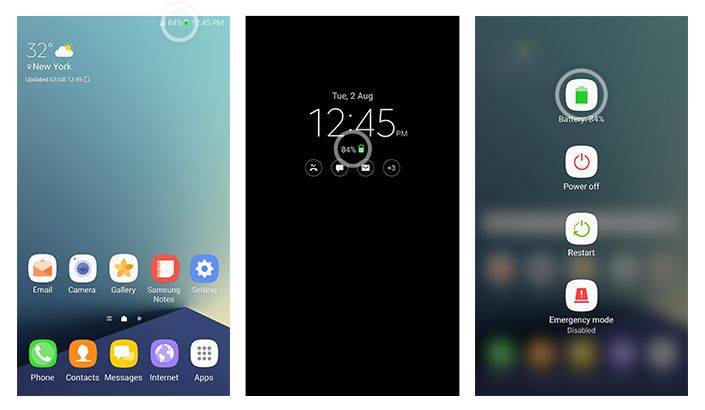 Samsung’s green battery icon will likely do little to deter the FAA and airlines from advising passengers not to bring Galaxy Note 7 devices on planes. Samsung may have fumbled this global recall on multiple occasions, but if your device is affected then you should return it to Samsung immediately. It’s simply not worth risking personal injury or loss of property.
Source : http://www.theverge.com/2016/9/19/12900530/samsung-galaxy-note-7-imei-checker